
Every vendor.
On your terms.
Analytics, chat, video, marketing pixels, ad tech: every third-party service on your site is a vendor your visitors consent to. The Cookie Scanner finds them automatically, and you control each one from a single panel.



Trusted by 2,000+clients worldwide
What you control
Automatic discovery
The Cookie Scanner detects the vendors actually present on your pages and adds anything missing with the right category mapping in one click.
Cookie Scanner →Any third-party service
Analytics, heatmaps, chat widgets, embeds, your own pixels: add any vendor, each labeled by how consent is enforced, automatically via Consent Mode or gated by attribute/GTM.
Tag orchestration →Custom purposes
Define purposes beyond the standard lists and scope them per regulation, so disclosures match what you actually do.
Inside the Platform
Vendor control without spreadsheets
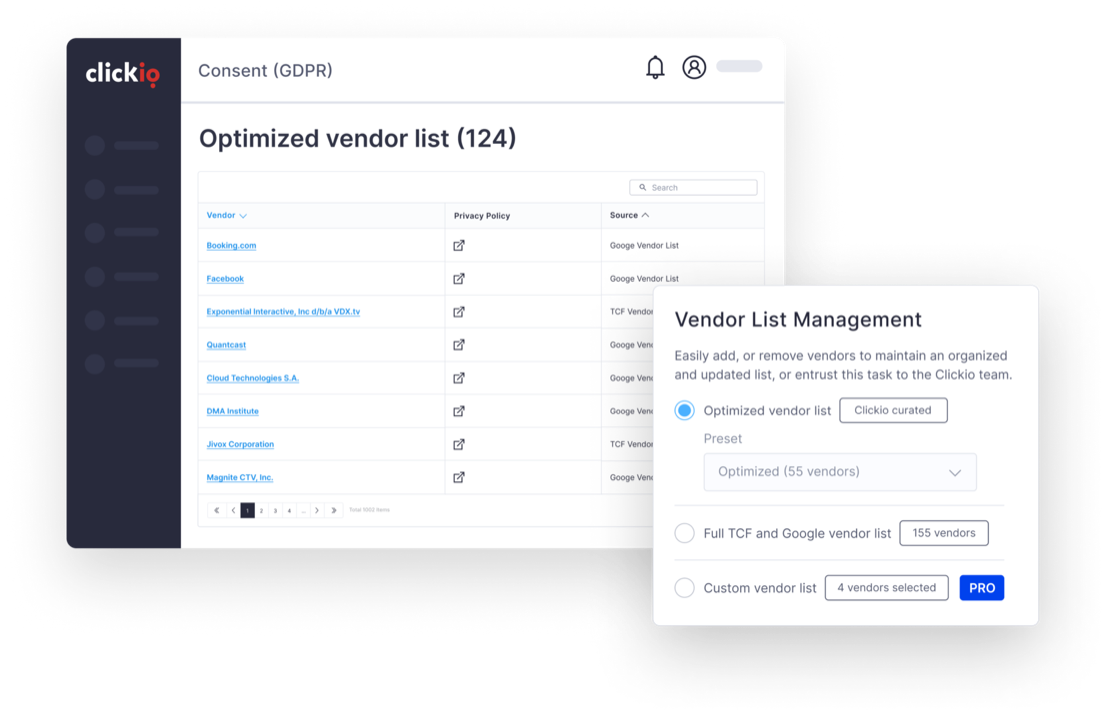
Vendor lists are managed visually in the Clickio Platform: review what the scanner found, toggle vendors on or off, add your own entries, and publish. The dialog and the cookie list update everywhere, with no tag changes.
- Detected, framework and custom vendors in one searchable list
- Per-vendor labels showing how consent is enforced
- Changes go live without touching your site code
Why the vendor list matters
Accuracy
Sites accumulate tools: a new chat widget here, a marketing pixel there. A vendor list that drifts from reality means undisclosed data sharing. The Cookie Scanner keeps the two in sync.
Accountability
Every vendor on the list is a data recipient you answer for. Curating the list is a compliance decision, not just a UX one.
Visitor trust
A dialog naming hundreds of vendors reads as alarming. A curated list keeps disclosure honest while presenting choices visitors can actually evaluate.
Frequently asked questions
How do I know my list matches reality?
Run the Cookie Scanner. It detects the vendors actually setting cookies and storage on your pages and flags anything your list is missing.
What kinds of vendors can I manage?
Any third-party service your site uses: analytics, heatmaps, chat widgets, video embeds, your own pixels, plus IAB TCF and Google advertising vendors if you run ads. Each is labeled by integration type: automatic when the vendor supports Consent Mode, or manual gating via script attribute or GTM trigger.
Can different countries get different vendor lists?
Yes: geo-specific vendor lists are available from the Starter plan, so each market's dialog matches the partners you use there.
What is the "optimized" vendor list?
For ad-supported sites: a curated preset of the advertising vendors that matter for a typical setup, so the dialog stays readable without hundreds of entries inflating it. You can extend or replace it at any time.
Does a smaller list mean lower ad revenue?
Not necessarily. Many vendors on a maximal list never participate in your auctions. Enterprise accounts can A/B test different lists to see which vendors contribute, so you can keep the list lean without losing demand.
Let the Cookie Scanner draft the list, then make it yours.
Optimized vendor lists and custom non-TCF vendors are on every plan. Geo-specific vendor lists start on Starter; custom TCF & Google ATP lists on Pro.